
Reference Architecture: The Bidirectional Support Bridge
Connecting a multi-tenant SaaS application to a customer support platform is fundamentally a systems engineering challenge. Many basic integrations stop at creating a ticket when a contact form is submitted. But in a production SaaS environment, support data must flow bidirectionally between your application backend and your support engine.
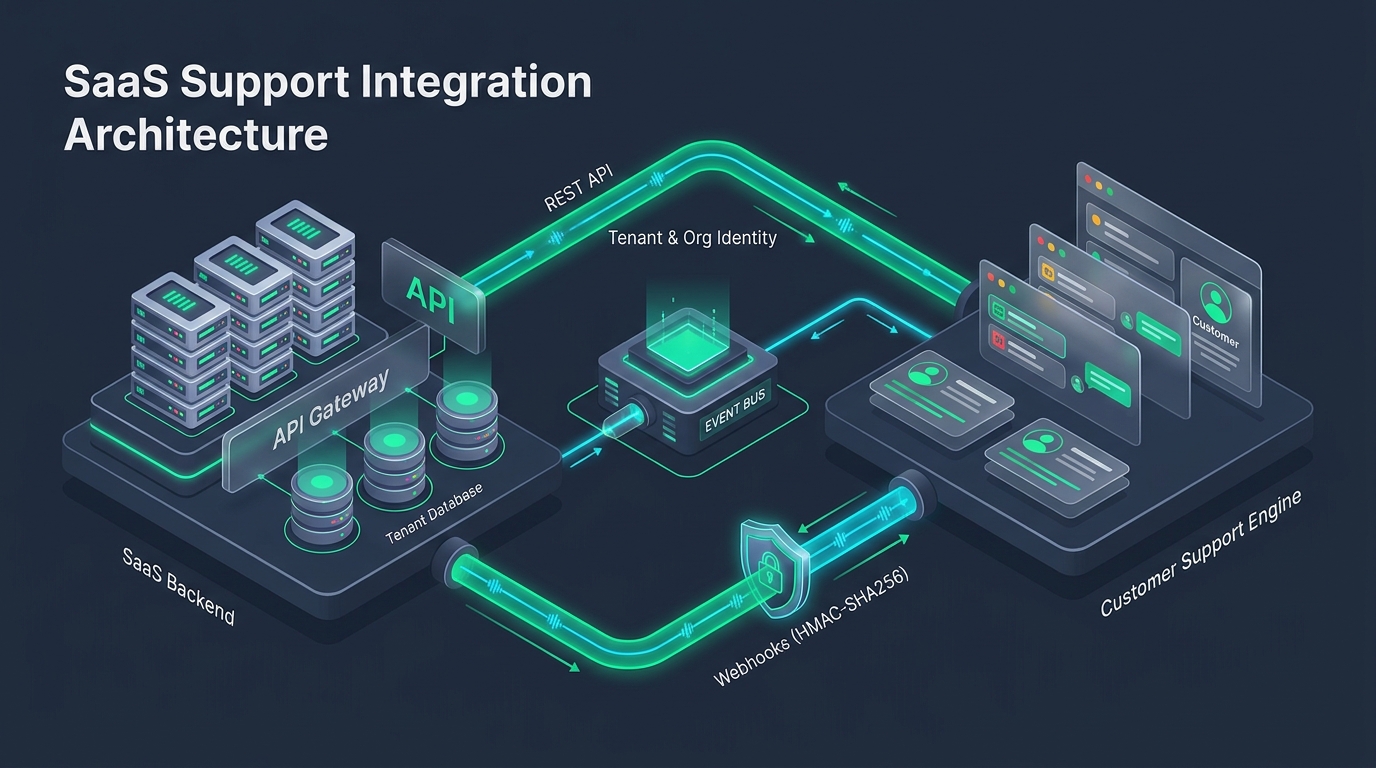
The reference architecture comprises four essential components:
- The SaaS Application Backend: The authoritative source for user sessions, organization memberships, subscription tiers, and feature entitlement flags.
- The REST API Gateway: Secure server-side conduits for creating tickets, attaching diagnostic telemetry, and retrieving status updates.
- The Event Bus & Webhook Worker: An asynchronous ingestion pipeline that listens for helpdesk events (e.g.
ticket.resolved,reply.created) and updates internal systems. - The Multi-Brand Support Engine: The managed operational platform (such as HDdesk) managing queues, outbound email delivery, and agent assignment.
Defining Sources of Truth: App Data vs. Ticket Data
A frequent architectural anti-pattern is data duplication between the SaaS database and the support platform. To maintain clean systems, establish strict ownership boundaries:
| Domain Entity | System of Record (Authoritative) | Sync Strategy |
|---|---|---|
| User Identity & Credentials | SaaS Primary Database (PostgreSQL / MySQL) | Passed as metadata headers during ticket dispatch; never stored as editable records in helpdesk |
| Organization / Plan Tier | SaaS Billing Service (Stripe / Database) | Injected dynamically via tags (e.g. plan:enterprise, arr:50k) |
| Conversation & Thread History | Support Engine (HDdesk) | Retrieved on-demand via API or viewed in the agent console; not duplicated in application DB |
| Ticket Status & Escalation Flags | Support Engine (HDdesk) | Propagated to SaaS application via signed webhooks |
Outbound Pipeline: Server-to-Server REST APIs & Secrets
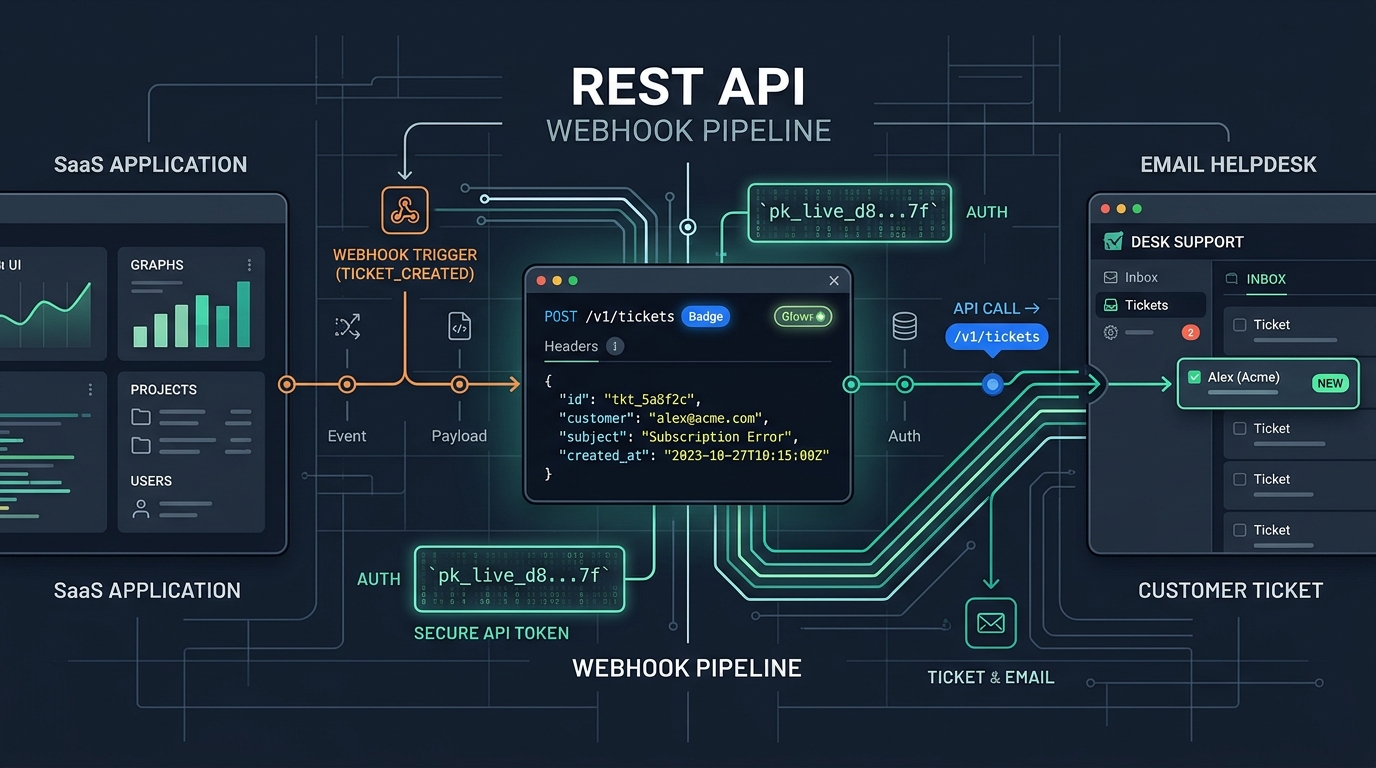
All programmatic interactions with your helpdesk must originate from your secure backend servers. Never expose administrative API tokens in client-side single-page applications (SPAs) or mobile app binaries.
When dispatching tickets from background workers or API gateways, enforce these four engineering practices:
- Strict Secret Isolation: Store API tokens in environment variables or cloud secret managers (e.g., AWS Secrets Manager, Cloudflare Secrets). Rotate tokens periodically.
- Mandatory Idempotency Keys: Pass a unique
Idempotency-Keyheader (such as a UUID combined with the customer action) on every ticket creation call. This prevents duplicate tickets if an ephemeral network failure triggers a worker retry. - Timeout Budgeting: Set aggressive HTTP client timeouts (e.g., 3–5 seconds) when calling external APIs during synchronous user requests. If the helpdesk API does not respond within the budget, queue the job asynchronously rather than blocking your user's UI.
- Rate Limit Awareness: Monitor HTTP 429 status codes and parse standard
Retry-Afterresponse headers to back off dynamically.
Inbound Pipeline: HMAC-SHA256 Webhook Verification
When an agent resolves a ticket or leaves an urgent update, your SaaS platform often needs to react—for example, posting a notification into an internal Slack channel, logging an audit trail, or updating an in-app status badge.
Webhooks transmit these events over public HTTP. To protect your ingestion endpoints from forged requests or replay attacks, you must cryptographically verify the signature of every incoming payload:
import crypto from 'crypto';

function verifyWebhookSignature(req, res, next) {
  const signature = req.headers['x-hddesk-signature'];
  const timestamp = req.headers['x-hddesk-timestamp'];
  const webhookSecret = process.env.HDDESK_WEBHOOK_SECRET;

  if (!signature || !timestamp) {
    return res.status(401).json({ error: 'Missing webhook security headers' });
  }

  // Prevent replay attacks (reject payloads older than 5 minutes)
  const currentTime = Math.floor(Date.now() / 1000);
  if (Math.abs(currentTime - parseInt(timestamp, 10)) > 300) {
    return res.status(401).json({ error: 'Webhook timestamp expired' });
  }

  // Compute HMAC SHA256 digest over timestamp + raw payload
  const hmac = crypto.createHmac('sha256', webhookSecret);
  hmac.update(`${timestamp}.${req.rawBody}`);
  const expectedSignature = hmac.digest('hex');

  // Constant-time comparison prevents timing attacks
  const isValid = crypto.timingSafeEqual(
    Buffer.from(signature, 'hex'),
    Buffer.from(expectedSignature, 'hex')
  );

  if (!isValid) {
    return res.status(403).json({ error: 'Invalid cryptographic signature' });
  }

  next();
}
Engineering Resilience: Idempotency, Retries, and DLQs
Webhooks are delivered over unreliable networks. Your webhook receiver must be engineered for high availability and zero message loss:
Asynchronous Queueing Pattern
Never perform heavy database mutations or external API calls synchronously inside your webhook handler. Verify the signature, write the raw payload to an internal queue (e.g. SQS, Redis BullMQ, RabbitMQ), and immediately respond with 200 OK. Process the actual business logic asynchronously.
Follow these resilience rules:
- Idempotent Event Processing: Always record the helpdesk's unique event ID in your local database. If a webhook delivery is retried, check whether the event has already been processed before executing side effects.
- Exponential Backoff: When downstream workers fail to process an event due to a database lock, retry with exponential backoff and jitter.
- Dead-Letter Queue (DLQ): Route messages that fail repeatedly (e.g., after 5 attempts) to a dead-letter queue for engineering inspection rather than discarding them.
Security, Compliance, and PII Hygiene
Support interactions inevitably touch Personally Identifiable Information (PII). When architecting the integration pipeline, maintain strict data hygiene:
- Principle of Least Privilege: Restrict your API tokens strictly to the scopes required. If a background worker only needs to create tickets, do not grant it administrator or mailbox deletion privileges.
- Sanitize Diagnostic Traces: When automatically attaching crash reports or browser logs to tickets, sanitize authentication tokens, cookie headers, and passwords prior to transmission.
- Audit Logging: Maintain immutable logs of when internal systems query customer support data, ensuring compliance with SOC 2 and GDPR requirements.
By treating support integration as a first-class architectural concern, engineering teams build resilient, secure bridges that scale seamlessly with business growth. Review our API guides to inspect available endpoints and webhook payloads.