

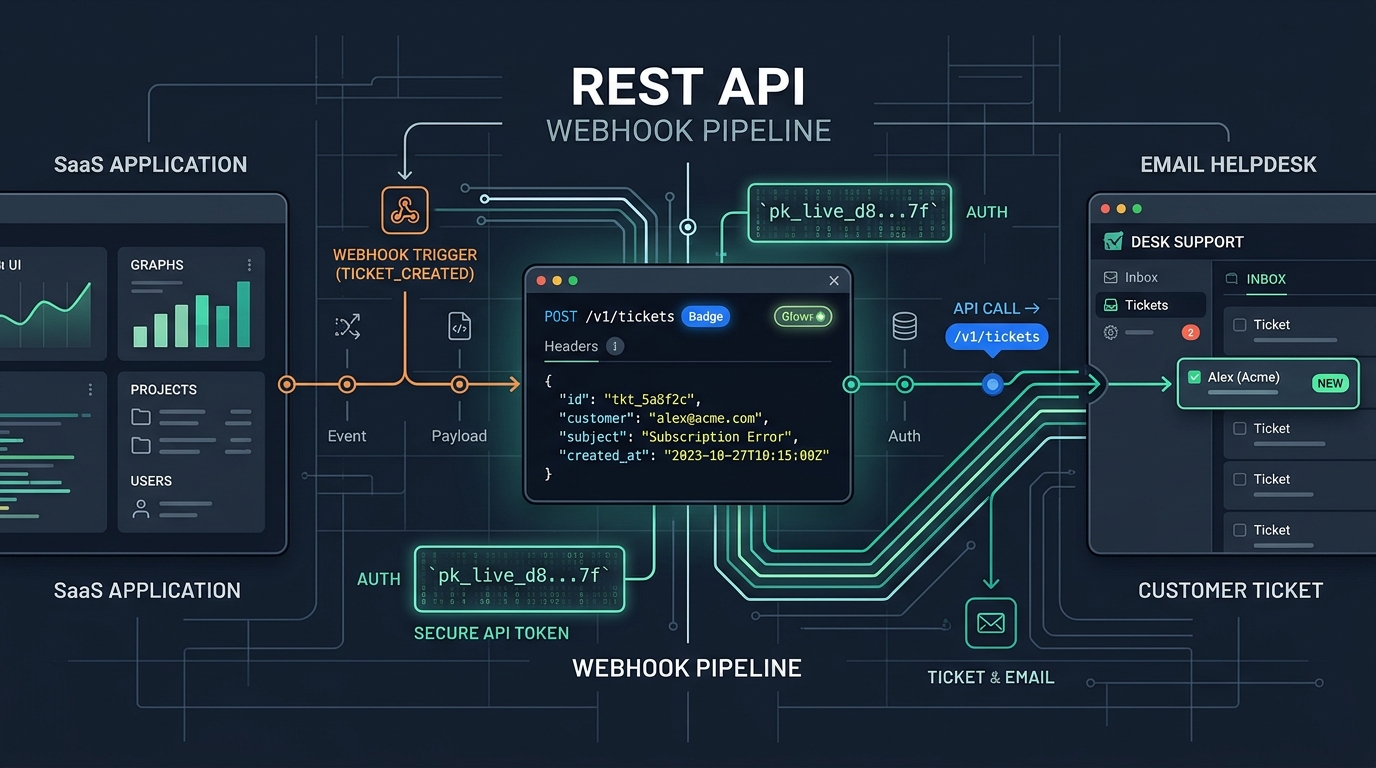
The Support-Context Gap in SaaS Applications
In most software companies, there is an invisible chasm between the production application database and the customer support desk. A user encounters an error in your web app, opens an email to your support address, and writes: "My project export failed with code 500."
When the support ticket arrives, the agent or engineer answering it has no immediate context. They don't know the customer's organization ID, their current subscription plan, their server region, or which browser version triggered the failure. The agent must either ask the customer for basic account information or spend five minutes manually querying production databases.
This back-and-forth frustrates users and drains engineering hours. A thoughtful helpdesk API integration closes this gap by programmatically linking your SaaS application to your customer support infrastructure.
Core Integration Patterns for Engineering Teams
Connecting your software to a helpdesk typically involves three distinct architectural patterns:
1. In-App Context-Rich Ticket Creation
Instead of forcing users to navigate away to a separate email client or external portal, you can embed a native contact or feedback form inside your app. When the user submits the form, your backend enriches the request with server-side account metadata (e.g., tenant ID, account tier, active feature flags) and calls the helpdesk API to create a ticket.
2. Automated Exception & Event Ticketing
When high-priority business events occur—such as a failed enterprise data synchronization or a subscription cancellation from a VIP account—your background job workers can programmatically dispatch a ticket directly into the appropriate queue for proactive outreach.
3. Bi-Directional Webhook Event Syncing
By registering HMAC-signed webhooks, your application can listen for ticket status changes (e.g., ticket resolved, ticket reopened, new customer reply) and update internal dashboards, notify account managers in Slack, or display resolution alerts inside the user's dashboard.
Security First: Server-Side vs. Client-Side Architecture
The single most critical rule of helpdesk API integration is strict credential isolation:
Critical Security Principle
Never expose privileged helpdesk API keys in client-side code. Helpdesk API keys often have broad read-write access to customer names, email addresses, and support conversation histories. Any key embedded in frontend JavaScript, mobile bundles, or HTML templates can be extracted by any user.
All interactions with the helpdesk API must be routed through your own authenticated server-side backend:
- The authenticated user submits a support form to your application API endpoint (e.g.,
POST /api/support). - Your server validates the user's session token and verifies tenant permissions.
- Your server injects trusted account metadata (such as verified user email, organization ID, and plan tier).
- Your server securely calls the helpdesk REST API using an environment variable secret (
HDDESK_KEY) and returns a clean success response to the client.
Engineering Evaluation Criteria for Helpdesk APIs
When evaluating whether a helpdesk platform is developer-friendly, look beyond basic marketing claims and review the technical API documentation for these five requirements:
- RESTful Conventions & Clean Payloads: Endpoints should follow standard HTTP methods, accept JSON payloads, return predictable HTTP status codes, and format timestamps in ISO 8601 UTC.
- First-Class Idempotency: Network timeouts are inevitable. The API should accept an
Idempotency-Keyheader so your background workers can safely retry POST requests without generating duplicate tickets. - Explicit Rate Limits: The API should return standard headers (such as
RateLimit-Limit,RateLimit-Remaining, andRetry-Afteron 429 responses) so your clients can implement exponential backoff. - Multi-Domain Routing: If you operate several products, the API should allow you to associate tickets with specific brand domains (via a
domain_id) so emails route into the correct queue and outbound replies use the correct sender identity. - Signed Webhooks: Webhook payloads must include cryptographic signatures (such as HMAC-SHA256) so your receiving server can verify authenticity and protect against spoofing attacks.
Practical Implementation: Programmatic Ticket Creation
Here is an example of creating a context-rich support ticket using HDdesk's REST API at https://app.hddesk.com/v1/tickets:
curl -X POST https://app.hddesk.com/v1/tickets   -H "Authorization: Bearer $HDDESK_KEY"   -H "Idempotency-Key: form-submit-8f72a1"   -H "Content-Type: application/json"   -d '{
    "subject": "Data export failed on project 1042",
    "description_text": "The export job timed out after 30 seconds with error 504.",
    "requester": {
      "name": "Sarah Connor",
      "email": "sarah@cyberdyne.example"
    },
    "domain_id": "dom_01JBC9...",
    "tags": ["exports", "tier-enterprise", "us-east-1"],
    "priority": "high"
  }'
And the expected JSON response from the endpoint:
{
  "id": "tkt_01JCE...",
  "number": "CYBER-1042",
  "status": "open",
  "priority": "high",
  "domain_id": "dom_01JBC9...",
  "created_at": "2026-10-14T14:32:00Z"
}
Notice how specifying the domain_id ensures the ticket is automatically assigned to the correct brand profile with its own sender address, templates, and SLA policy, while the Idempotency-Key guarantees that if the request times out, retrying with the same key will not create a second ticket.
Retries, Idempotency, and Production Monitoring
To make your support integration production-ready, apply standard distributed systems patterns:
1. Implement Exponential Backoff with Jitter
If your server receives a 429 Too Many Requests or a 503 Service Unavailable error, do not retry immediately in a tight loop. Parse the Retry-After header if present, or retry with randomized exponential backoff (e.g., 1s, 2s, 4s plus a small random jitter).
2. Separate Fast Paths from Background Queues
When a customer submits a contact form, do not block the HTTP response waiting for the third-party helpdesk API to respond. Enqueue a job in your background worker queue (such as BullMQ, Celery, or Cloudflare Queues), return an immediate success message to the user, and let the worker process the API call asynchronously.
3. Log Request IDs for Fast Troubleshooting
Log the request ID returned in API response headers. If an unexpected error occurs, having the exact timestamp and request ID allows you to pinpoint the issue immediately when speaking with developer support.
Architecting Your Support Pipeline
Customer support does not have to be an isolated manual silo. By treating support as an integrated layer of your software platform, you can give your team immediate operational context, accelerate resolution times, and deliver a vastly superior user experience.
Review the HDdesk API documentation to explore available endpoints, authentication keys, and webhooks for your products.
Build on a developer-first email helpdesk
HDdesk includes a stable REST API, idempotency keys, and signed webhooks on every plan. No enterprise upgrades required.