

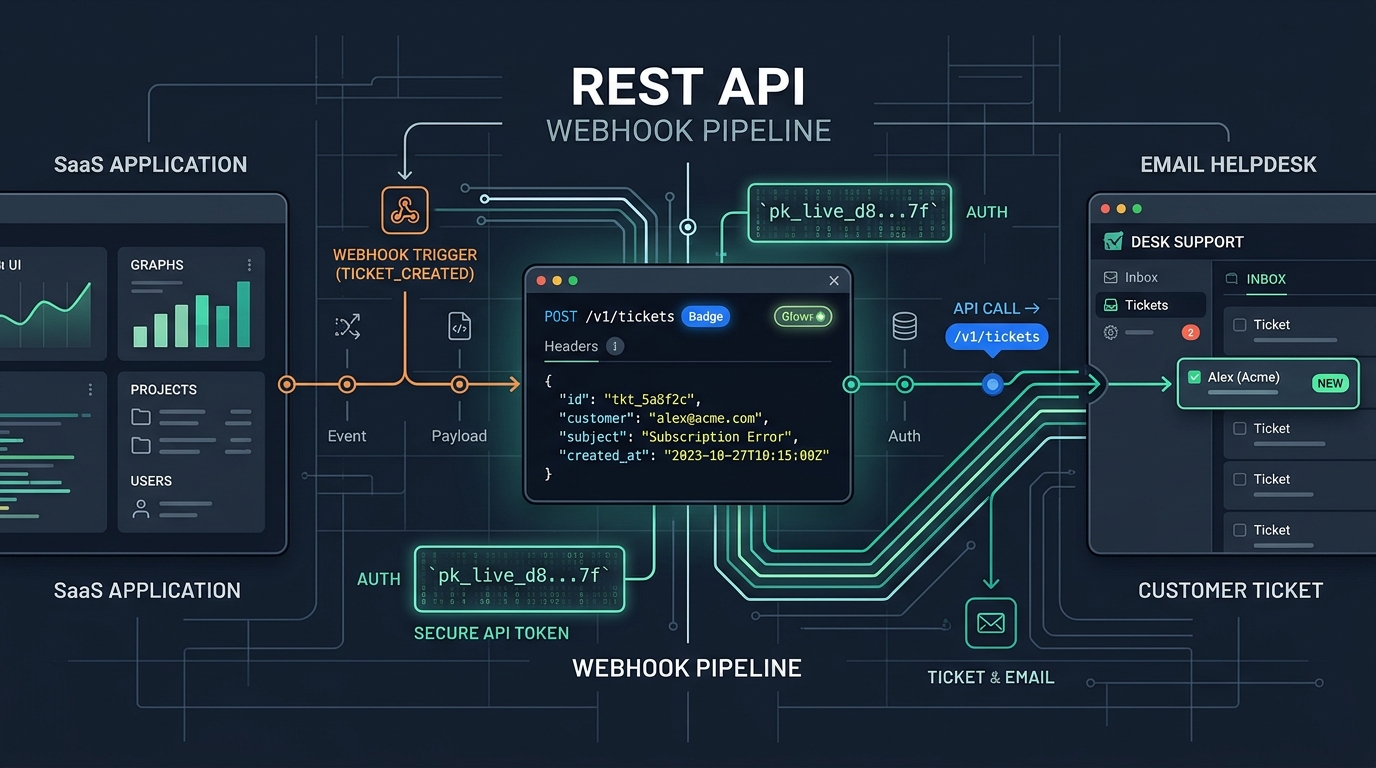
Native Triage Rules vs. Cross-System API Automations
When discussing support automation, it is crucial to separate two distinct mechanisms that operate at different levels of your stack:
1. In-Helpdesk Triage Rules
These are declarative rules configured directly inside the helpdesk console. They evaluate incoming email properties and trigger internal routing actions. For example: "If the incoming recipient is billing@acme.com, tag the ticket billing, set priority to High, and assign it to the Finance group." These rules are essential for basic inbox hygiene and require no custom engineering.
2. Cross-System API Automations
These are programmatic integrations connecting your external application database, CRM, or billing system to your helpdesk via REST endpoints and webhooks. For example: when a customer downgrades their plan in Stripe, an automation checks whether they have open support tickets; or when an unhandled server exception strikes an enterprise account, a ticket is created with debugging logs automatically attached.
Combining both layers allows engineering and support teams to eliminate manual busywork while maintaining clean architectural boundaries.
High-Impact Automated Workflows for SaaS Teams
Instead of trying to automate everything at once, focus on workflows that eliminate manual context-switching:
1. Smart Escalation for Churn-Risk Accounts
When an incoming ticket arrives from a customer who recently triggered a cancellation survey or whose usage dropped by 50%, your backend can listen for the ticket.created webhook, look up the customer's account health score, and automatically update the ticket priority to Urgent via API.
2. Bug Reports with Embedded Diagnostic Logs
When a user clicks "Report a Problem" inside your app, don't just capture a text box. Programmatically capture their active URL, browser version, client viewport, recent network request status codes, and user ID. When the ticket is generated, this data is formatted into an internal note on the ticket, giving the responding engineer immediate reproducibility without having to ask the customer.
3. Account Email Synchronization
When an organization administrator updates their corporate billing or notifications email address inside your SaaS dashboard, dispatch an API call to update the contact record in your helpdesk. This prevents tickets from being misattributed when the user writes in from their new address.
Data Minimization: What Belongs in the Helpdesk
A common mistake in automated workflows is dumping entire database records or raw session dumps into customer support tickets. This introduces severe compliance and security vulnerabilities:
The Principle of Data Minimization
Never send sensitive authentication tokens, unhashed passwords, credit card numbers, or full personal identity documents into your helpdesk. Support tickets are widely read by multiple team members and may be exported or forwarded.
| Data Category | Include in Ticket Payload? | Architectural Rationale |
|---|---|---|
| Account Identifier (UUID) | Yes | Allows agents to query internal admin panels safely |
| Plan Tier (e.g. Pro, Enterprise) | Yes | Enables SLA prioritization and appropriate handling |
| Error Code / Exception Name | Yes | Provides immediate technical context for engineers |
| Full Database Rows / PII | No | Keep in production database; reference by ID only |
| API Keys / Auth Tokens | Never | Severe security hazard if ticket is forwarded or viewed |
Building Resilient Webhook Handlers
When automating actions based on helpdesk events (such as reacting to a new ticket or a status update), your receiving webhook endpoint must be engineered for resilience:
- Verify HMAC Signatures: Always validate the signature header using your shared webhook secret to ensure the payload was genuinely sent by your helpdesk.
- Respond with 200 OK Immediately: Perform expensive operations (like sending notifications or updating external CRMs) in background queues. Return a
200 OKresponse within 500 milliseconds to prevent timeout retries from the webhook sender. - Implement Idempotent Event Handlers: Webhook delivery is typically "at-least-once." Network delays can cause the same event payload to be delivered twice. Ensure your handler checks whether it has already processed the event ID before taking state-altering actions.
Step-by-Step Implementation Guide
To implement your first automated support workflow:
- Identify the highest-friction manual task: Ask your team which ticket type requires the most manual back-and-forth for basic information.
- Map the required fields: Define the minimum payload needed to resolve that issue.
- Build a server-side proxy endpoint: Create a secure backend endpoint in your app that accepts user input and calls the helpdesk API using server-side secrets.
- Test failure modes: Simulate network dropouts and verify that idempotency keys prevent duplicate tickets.
- Deploy and measure: Track the reduction in time-to-first-reply and time-to-resolution.
Automate your support with HDdesk's REST API
Discover clean endpoints, predictable payloads, and signed webhooks to connect your product directly into your helpdesk.