
The Brand Fracture Problem: Why Third-Party Portals Hurt Trust
You have spent hundreds of hours perfecting your software's user interface: crisp typography, polished CSS animations, and an intuitive onboarding workflow. Your users feel they are using a modern, professional, cohesive SaaS application.
Then, the user clicks "Help" in your navigation bar. Suddenly, they are redirected to acme-software.external-helpdesk-vendor.com. The page layout changes completely, the logo is distorted, and the footer proudly displays a banner for an enterprise customer service vendor. When your team replies to their ticket, the email arrives from support@acme.external-helpdesk-vendor.com.
This is known as brand fracture. To paying enterprise customers and discerning consumers, brand fracture signals amateurism. It introduces cognitive friction, makes users wonder if they have landed on a phishing page, and chips away at your product's perceived value.
The Trust Multiplier
Support is a core brand touchpoint. When your help center, live chat, and support emails look and feel 100% native to your company, customers perceive your software as mature, secure, and established.
The Three Pillars of White-Label Support
A true white-label customer support experience requires alignment across three distinct surfaces:
| Support Surface | What the Customer Should Experience | Technical Requirement |
|---|---|---|
| Web Knowledge Base & Portal | Hosted at your own subdomain (e.g. help.yourdomain.com) with your brand palette, favicon, and fonts |
Custom CNAME record with automated SSL certificate provisioning |
| Inbound & Outbound Email | Emails sent from and delivered to support@yourdomain.com without third-party vendor "via" headers |
Custom MX/forwarding rules plus authenticated SPF and DKIM DNS records |
| In-App Live Chat Widget | Embedded chat button that matches your product's primary theme color and typography | Configurable CSS tokens, custom launcher icons, and zero third-party vendor watermarks |
Custom Help Domains: Moving Beyond Vendor URLs
The first step in white-labeling is hosting your public documentation and ticket portal on your own domain name. Rather than exposing an awkward vendor subdomain, configure a clean CNAME record in your DNS provider (Cloudflare, AWS Route 53, or Namecheap):
Type:  CNAME
Name:  help
Value: cname.hddesk.com
Proxy: DNS Only (or Proxied, depending on provider)
A modern helpdesk automatically provisions and renews TLS/SSL certificates for your custom domain using Let's Encrypt or Cloudflare SSL for SaaS. Visitors navigate to help.yourbrand.com with complete HTTPS security and zero visual indication of the underlying helpdesk provider.
Authenticating Outbound Email: SPF, DKIM, and DMARC
White-labeling email is not merely a cosmetic requirement—it is a critical deliverability imperative. Modern mail providers (Google Workspace, Microsoft 365, Yahoo) strictly enforce DMARC policies. If your support desk sends emails on behalf of yourbrand.com without matching cryptographic signatures, customer inboxes will flag your replies as spam or reject them outright.
To achieve pristine deliverability:
- SPF (Sender Policy Framework): Add your helpdesk's sending IP range to your root domain's TXT record (e.g.
v=spf1 include:_spf.hddesk.com ~all). - DKIM (DomainKeys Identified Mail): Publish 2048-bit CNAME or TXT keys provided by your helpdesk. This enables outbound messages to carry a tamper-proof digital signature verified against your domain.
- Clean Sender Headers: Ensure outbound emails display
Support <support@yourbrand.com>in both theFrom:andReturn-Path:headers, eliminating the unsightly "via thirdparty.com" badge in Gmail.
Managing Multiple White-Labeled Brands in One Queue
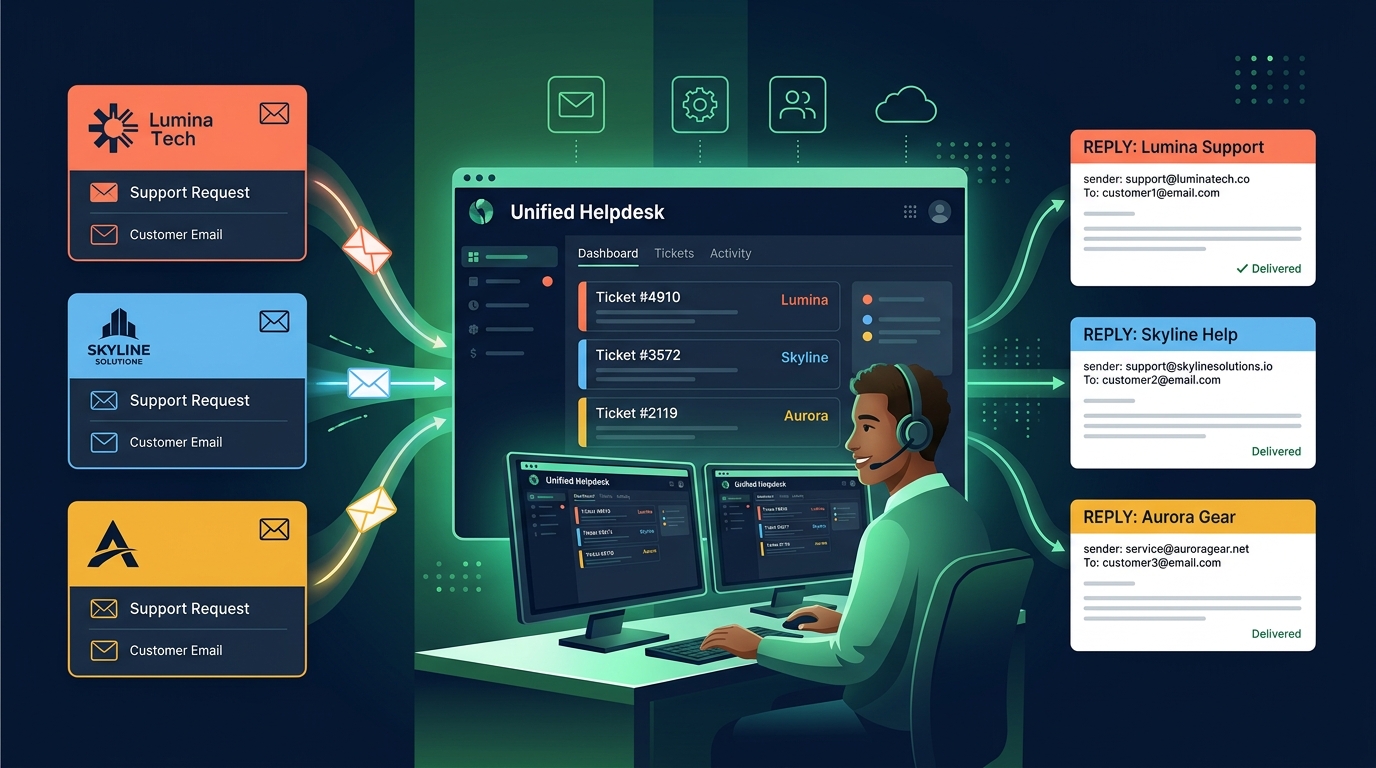
For SaaS studios, holding companies, and digital agencies, the challenge multiplies: you don't just need one white-labeled support portal—you need five, ten, or twenty.
Traditionally, enterprise platforms forced agencies to purchase separate subscription accounts for every single client or product, quickly driving software expenses into thousands of dollars each month. Alternatively, teams attempted to manage multiple brands through messy shared Gmail accounts, leading to frequent brand leaks where an agent replied to a Client A inquiry using Client B's email signature.
With HDdesk, you manage up to 30 independent brand inboxes from a single shared workspace:
- Each brand has its own sender name, logo, custom email templates, and SLA rules.
- Each brand gets its own hosted help-site domain with dedicated documentation.
- Agents work from one unified triage queue. When an agent clicks "Reply," HDdesk automatically selects the correct sender identity and brand signature.
- Unlimited agent seats mean your entire team or contractor network can assist without per-seat fees.
The Technical Setup Checklist
Use this checklist when deploying a new white-labeled support brand:
- [ ] Point your custom help subdomain (e.g.,
help.brand.com) via CNAME to your helpdesk host. - [ ] Upload your brand mark, logo, and primary hex color codes.
- [ ] Configure inbound email forwarding from your corporate mail server to the helpdesk ingestion address.
- [ ] Add verified DKIM records to your domain's DNS to satisfy DMARC alignment.
- [ ] Customize outbound email signatures and footer copyright notices.
- [ ] Test inbound and outbound email delivery from both Gmail and Outlook accounts.
White-label support reinforces your brand credibility with every ticket resolution. Explore HDdesk's multi-brand features and see how our all-inclusive plans empower multi-product builders.